Calling a VI from the Stimulus Profile Editor: Yes, It’s Possible!
NI VeriStand is a highly flexible environment designed to support a wide range of applications—from rapid prototyping to HIL testing, all the way to basic real-time data logging.
One of VeriStand’s greatest strengths is its ability to integrate custom LabVIEW code in multiple ways:
- In the real-time engine, through Custom Devices or models
- In the workspace, as Custom Tools
- Or by directly controlling VeriStand from LabVIEW using the provided .NET API
The Stimulus Profile Editor: More Than Just a Sequencing Tool
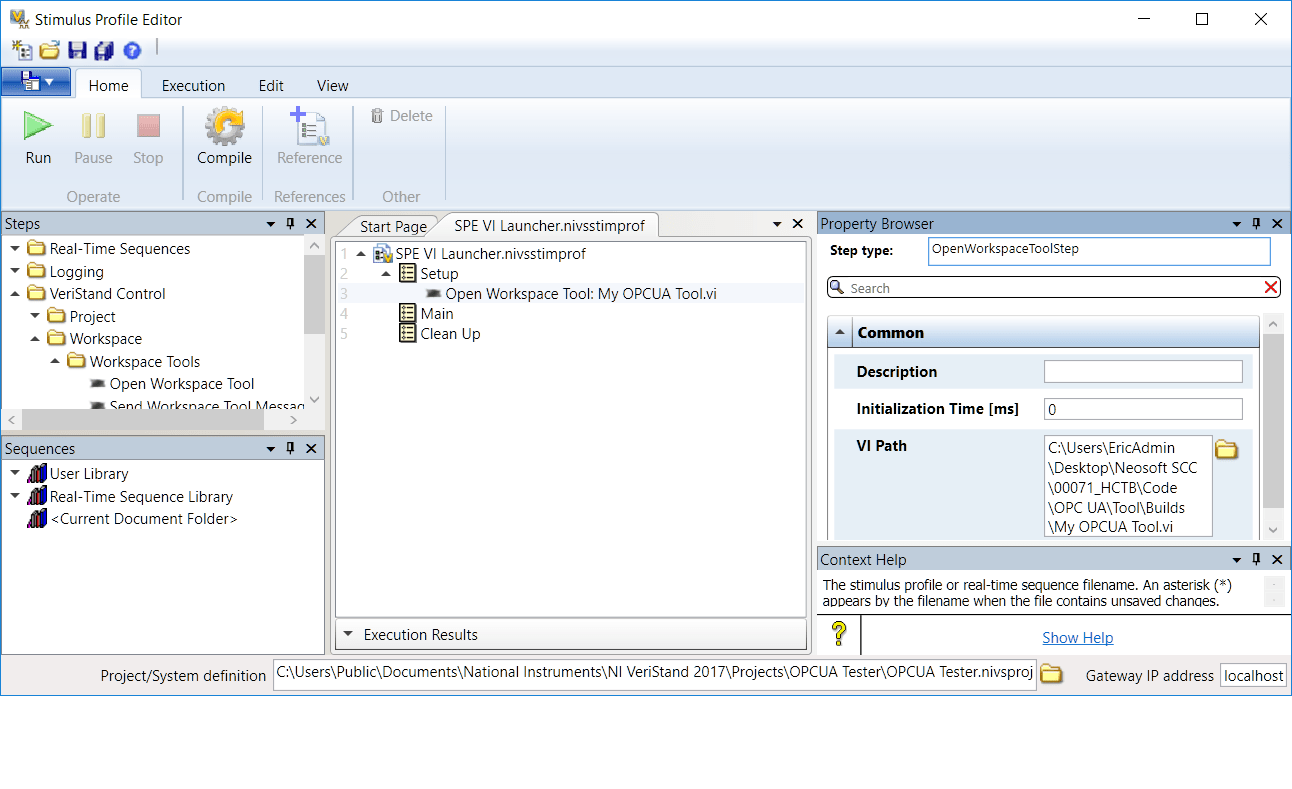
When running automated test scenarios in VeriStand, the Stimulus Profile Editor includes a powerful yet often overlooked feature: the “Open Workspace Tool” step.
This step can actually call any VI, as long as it contains all its dependencies.
To do this, simply generate a source distribution from LabVIEW.
With this technique, you can launch a daemon or an additional user interface during the execution of a stimulus, enabling advanced or interactive use cases.
Be Careful With Asynchronous Behavior
It’s important to remember that launching the VI is asynchronous: as soon as the VI starts, the stimulus continues execution without waiting for it to finish.
If your application requires blocking behavior—for example, waiting for user interaction or manual validation—you must instead create an executable containing the VI and call it using the “Command Shell” step.
This approach ensures the stimulus pauses until the external process ends, giving you full control over the test sequence.

➡️ Exemple d’application :
Pour attendre une interaction utilisateur ou une validation manuelle. Il faut alors créer un exécutable contenant ce VI et l’appeler via le step “Command Shell”.
Cette approche garantit que le stimulus suspendra son exécution jusqu’à la fin du processus externe, offrant un contrôle total sur la séquence de test.
In Summary
✅ Yes, it is possible to call a VI from the Stimulus Profile Editor.
💡 Use the “Open Workspace Tool” step for asynchronous execution.
🧩 For blocking execution, use an executable with the “Command Shell” step.
This feature, although discreet, once again highlights the flexibility of NI VeriStand and its ability to adapt to complex and scalable test architectures.
Featured Insights

Calling a VI from the Stimulus Profile Editor: Yes, It’s Possible! bis
Yes, it is possible to call a VI directly from the Stimulus Profile Editor! Discover how to use this feature

5 Tips to Optimize Your TestStand Sequences and Reduce Test Time
Optimize your TestStand sequences with these 5 key tips: better organization, reduced execution time, code optimization, and proven development best
How can we help you?
Receive a personalized response from our experts within 24 hours, with solutions tailored to your automation and data acquisition needs.